Network & diagnostics
WinSCP
Graphical SFTP, SCP and FTP file transfer for Windows.
open sourcedesktop
Independent reference — this page is a review. WinSCP is downloaded from the vendor’s official site, not from here.
| Platforms | Windows (portable; runs on Linux via Wine) |
|---|---|
| Licence | Open source — GPL-3.0 |
| Price | Free |
| Section | Network & diagnostics |
| Updated | 2026-11-05 |
What it is
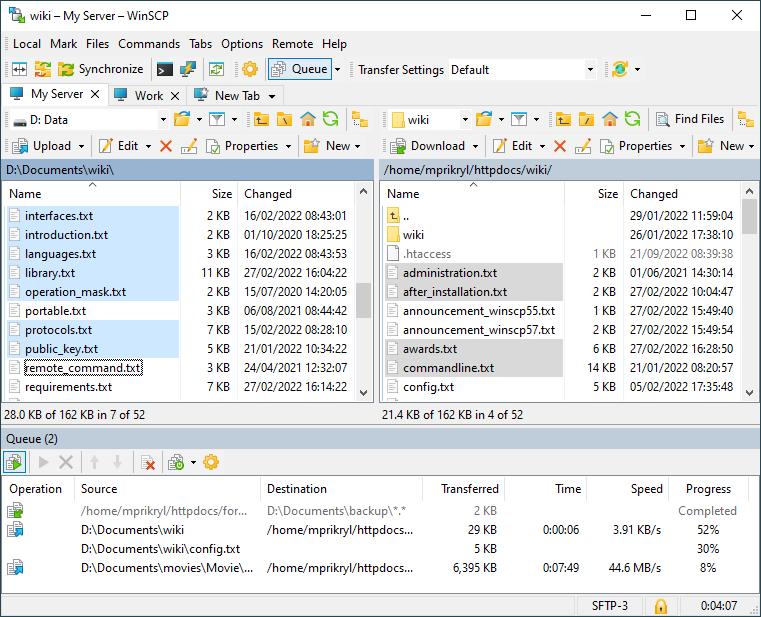
Graphical file transfer on Windows, speaking SFTP, SCP, FTP and WebDAV. Admins use it for secure file exchange with servers, directory sync and quick edits through its built-in editor.
Problems it closes
- You want a GUI for moving files securely to and from Linux servers.
- A remote config file needs a quick edit without a full SSH workflow.
How administrators run it
- Connect over SFTP or SCP and drag files between the local and server panes.
- Pop open the built-in editor for quick remote edits.
- Sync a local folder against a server directory.
Strengths & trade-offs
Strengths
- Free, with SFTP, SCP, FTP and WebDAV.
- Dovetails with PuTTY and its keys.
- Directory sync plus a built-in editor.
Trade-offs
- Windows only.
- GUI-first — scripting exists but plays second fiddle.
Common questions
Does it use the same keys as PuTTY?
Yes. It works with .ppk keys and will convert from other formats.
Can you automate transfers?
Yes. It carries a scripting and command-line interface for scheduled transfers.
Alternatives
PuTTY The free SSH, Telnet and serial client Windows admins always keep handy. open sourcedesktop Windows/macOS/Linux Royal TS Connection vault that pulls RDP, VNC, SSH and web sessions under one roof. freemiumdesktop Windows, macOS, mobile mRemoteNG Free tabbed connection manager for RDP, VNC, SSH and more, Windows only. open sourcedesktop Windows