Remote access & support
Royal TS
Connection vault that pulls RDP, VNC, SSH and web sessions under one roof.
freemiumdesktop
Independent reference — this page is a review. Royal TS is downloaded from the vendor’s official site, not from here.
| Platforms | Windows, macOS, mobile |
|---|---|
| Licence | Freemium — free Lite (10 connections); Single User €49 perpetual |
| Price | Free Lite tier; Single User €49 (perpetual) |
| Section | Remote access & support |
| Updated | 2026-11-05 |
What it is
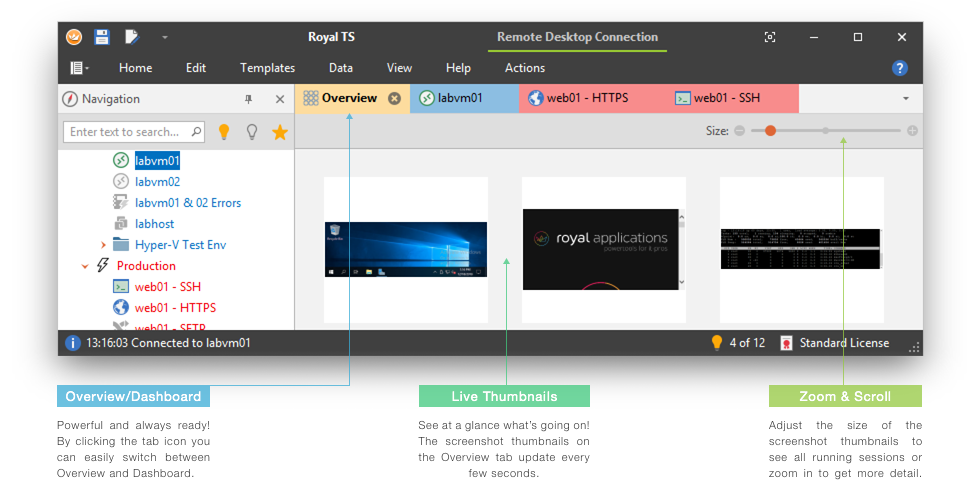
Think of it as a single home for connections of every stripe — RDP, VNC, SSH/Telnet, web, FTP/SFTP, plus TeamViewer, VMware and Hyper-V. Connections and credentials live in one place, share without exposing the secrets, and stay tidy behind tabs, folders and dashboards.
Problems it closes
- Dozens of servers, each with its own protocol and login, are scattered across separate tools.
- You need to share connection details with a team while keeping the passwords hidden.
How administrators run it
- Lay connections out in a folder tree that inherits settings and credentials.
- Hand round an encrypted document so the team connects without ever seeing the stored secrets.
Strengths & trade-offs
Strengths
- One console covers many protocols.
- Credentials get injected, never shown.
- A perpetual licence is on the table.
Trade-offs
- Free Lite tier stops at 10 connections.
- Full capability waits behind a paid licence.
Common questions
What’s the limit on the free Lite edition?
Ten saved connections; past that you need a paid licence.
Which protocols does it cover?
RDP, VNC, SSH/Telnet, web and FTP/SFTP, plus TeamViewer, VMware and Hyper-V sessions.
Alternatives
mRemoteNG Free tabbed connection manager for RDP, VNC, SSH and more, Windows only. open sourcedesktop Windows RustDesk Open-source remote desktop you can self-host, so sessions stay on servers you control. open sourcedesktop Windows, macOS, Linux, web, mobile PuTTY The free SSH, Telnet and serial client Windows admins always keep handy. open sourcedesktop Windows/macOS/Linux