Remote access & support
RustDesk
Open-source remote desktop you can self-host, so sessions stay on servers you control.
Independent reference — this page is a review. RustDesk is downloaded from the vendor’s official site, not from here.
| Platforms | Windows, macOS, Linux, web, mobile |
|---|---|
| Licence | Open source — AGPL-3.0 |
| Price | Free; optional paid Pro / self-hosted server |
| Section | Remote access & support |
| Updated | 2026-11-05 |
What it is
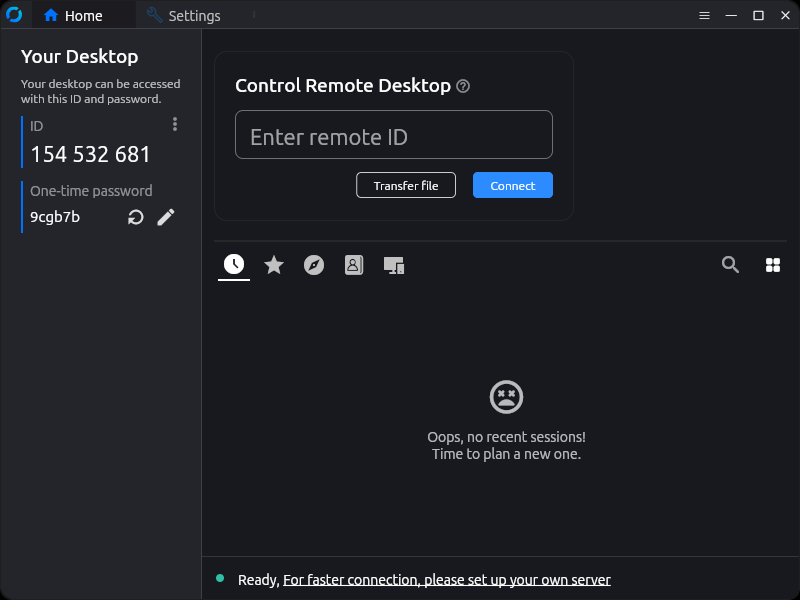
Self-hosting is the whole point here: stand up the relay and ID servers yourself and remote-control traffic never touches a vendor cloud. It covers remote desktop, file transfer and end-to-end encryption on every desktop and mobile platform, and goes head to head with TeamViewer and AnyDesk at no licence cost.
Problems it closes
- You need remote control but can’t route sessions through someone else’s cloud.
- Per-seat fees on the commercial tools no longer add up for a small team.
- Policy says remote-support data has to stay inside your own network.
How administrators run it
- Stand up the relay (hbbr) and ID (hbbs) daemons on a Linux box, then hand out clients already pointed at them.
- Set a fixed password on servers so they pick up unattended connections.
- Hand a user a one-time code for a short supervised session, then rotate the key to cut access.
Strengths & trade-offs
Strengths
- Self-hosting is a first-class option, not a bolt-on — no vendor cloud forced on you.
- Free and open source under AGPL-3.0.
- Clients for every platform, browser included.
Trade-offs
- Standing up and securing the relay is on you.
- Central management is thinner than the paid incumbents offer.
- Heavy NAT or mobile deployments take some tuning.
Common questions
Is it free to use at work?
Yes. The clients and the self-hosted server are open source with no fee. A paid Pro server adds management features on top, but core remote control costs nothing.
Do sessions pass through a public server?
Out of the box they lean on public ID servers, but run your own relay and the session stays on your local network.