Active Directory, security & utilities
Sysinternals Suite
Microsoft’s free kit for deep Windows diagnostics and fault-finding.
freemiumdesktop
Independent reference — this page is a review. Sysinternals Suite is downloaded from the vendor’s official site, not from here.
| Platforms | Windows |
|---|---|
| Licence | Freemium — proprietary freeware (Microsoft) |
| Price | Free |
| Section | Active Directory, security & utilities |
| Updated | 2026-11-05 |
What it is
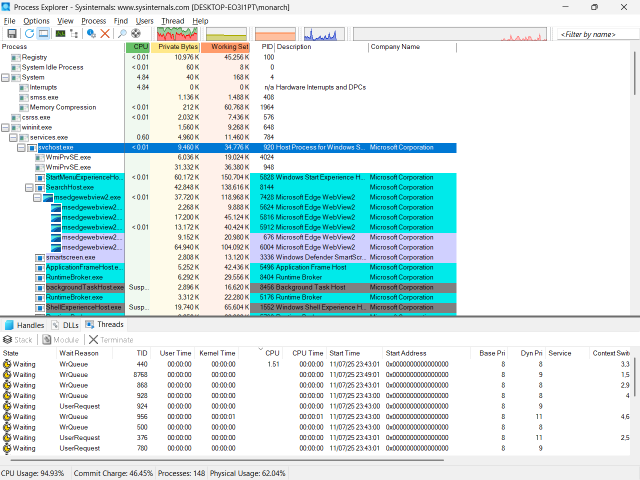
Dozens of free Microsoft utilities for Windows diagnostics and monitoring — Process Explorer, Autoruns, Process Monitor, PsExec — give you deep insight into processes, startup items, connections and file activity. When you’re investigating an incident, it’s hard to do without.
Problems it closes
- Windows Task Manager tells you too little about a misbehaving process.
- You need to see exactly what loads at startup, or what a process touches.
- A command has to run on a remote machine, fast.
How administrators run it
- Reach for Process Explorer and Process Monitor to trace processes, handles and file/registry activity.
- Use Autoruns to audit and trim startup items.
- Call PsExec for remote command execution.
Strengths & trade-offs
Strengths
- Free, from Microsoft, with deep Windows insight.
- Portable — no installation needed.
- Hard to do without when investigating an incident.
Trade-offs
- Windows only, and pitched at experts.
- A set of separate tools, not one unified app.
Common questions
Is it free?
Yes — free from Microsoft.
Does it need installing?
No. The tools are portable executables you run as-is.
Alternatives
KeePass Free, open-source password manager built on a local encrypted database. open sourcedesktop Windows (official); macOS/Linux via Mono; community ports Wireshark The standard packet analyser for capturing and reading network traffic. open sourcedesktop Windows/macOS/Linux/BSD/Solaris Nessus (Tenable) Widely used vulnerability scanner — free Essentials for up to 16 IPs. freemiumdesktop Windows/Linux/macOS (local web UI on port 8834)